
Document Workflow Automation Software: A Practical Guide
Learn how document workflow automation software eliminates doc rot, unifies fragmented sources, and keeps technical docs in sync with every code change.

Most advice about document workflow automation software starts with the wrong problem. It focuses on routing PDFs, collecting approvals, or replacing email reminders, while engineering teams lose far more time reconciling code changes, API specifications, uploaded files, and published documentation that no longer agree.
That synchronization gap creates doc rot. A release changes behavior, the repository moves on, and the customer-facing guide describes yesterday’s product. Automation that only moves documents faster can accelerate the distribution of incorrect information. The useful question isn’t “How do we eliminate document work?” It’s “How do we keep every approved output aligned with the sources that change it?”
The category is mature enough to attract serious investment and still expanding quickly. The global workflow automation market was valued at $26.5 billion in 2024 and is projected to exceed $78 billion by 2030, according to workflow automation market data. Yet the most difficult work remains architectural: connecting fragmented inputs, controlling AI-assisted edits, preserving review history, and deciding what should happen automatically versus what still requires a human.
Table of Contents
- Why Most Document Automation Projects Fail
- How Document Workflow Automation Software Actually Works
- Key Capabilities That Separate Modern Platforms from Legacy Tools
- Evaluation Criteria for Engineering Teams and Technical Leaders
- Real-World Use Cases Across Different Team Types
- Implementation Roadmap and Migration Checklist
- How GitDocAI Addresses the Gaps in Modern Documentation Workflows
Why Most Document Automation Projects Fail
Teams begin by automating the visible handoff. A document gets uploaded, a reviewer receives a notification, and an approval moves it to the next stage. That pattern works for repeatable administrative processes, but it doesn’t solve the deeper problem for developer teams: the document is usually downstream from several systems that keep changing.
A repository may define behavior that an old specification doesn’t mention. An OpenAPI file may contain endpoints missing from the help center. A technical writer may fix the wording in a standalone document, while a later generation job pulls from an older source and overwrites the correction. Each workflow can function correctly on its own while the published documentation becomes less trustworthy.
The real bottleneck is synchronization
Documentation goes stale because teams treat publishing as an event instead of a continuing relationship between sources and outputs. A release creates a burst of manual work, then attention moves elsewhere. Reviewers catch obvious errors, but they rarely have a reliable view of every affected page, version, example, and integration.
Fragmented inputs make this worse. Code repositories, product specifications, existing websites, PDFs, Word files, and plain-language drafts each carry different context. Without an explicit source hierarchy and change-detection process, “single source of truth” becomes a slogan rather than an operating model.
The adoption data supports a practical conclusion. 60% of companies implemented some form of automation in the past 12 months, rising to 84% among large enterprises, while 65% of organizations are expanding automation initiatives, according to workflow automation adoption benchmarks. The same source reports that only 4% have fully automated hands-free operations. Most teams therefore need automation that coordinates human review, not a fantasy of removing people from every decision.
Practical rule: Automate the detection, preparation, routing, and evidence trail. Keep humans responsible for ambiguity, policy exceptions, and final publication.
Governance becomes the hard part
AI can draft, summarize, translate, and restructure content quickly. That speed creates a control problem. Teams need to know what changed, which source prompted the change, who reviewed it, whether the edit can be reversed, and which permission allowed an assistant to act.
Industry coverage increasingly frames production GenAI around validation and governance, while IDC’s 2025 survey framing highlights continuing inefficiencies in document processes and uncertainty about the right vendor type. The practical implication is more important than the feature language: AI-assisted documentation needs reviewable, reversible changes. This concern is especially strong for regulated or cross-border teams, where an undocumented edit can create compliance and support risk.
Modern automation is therefore a synchronization and governance system. Faster routing still matters, but it’s secondary to keeping source systems and published outputs aligned over time.
How Document Workflow Automation Software Actually Works
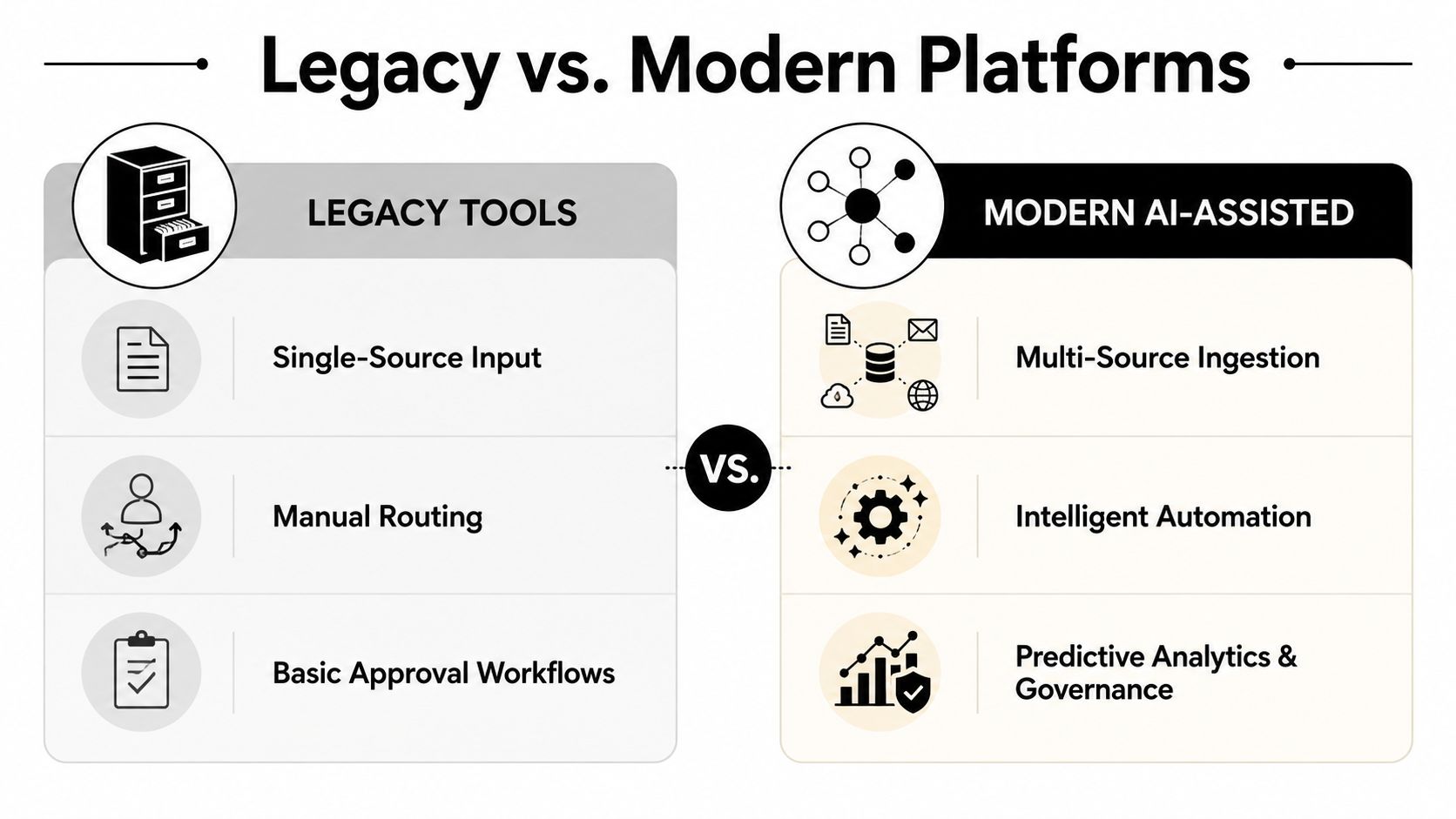
A useful platform behaves less like a shared folder and more like a pipeline. It receives source material, normalizes it, detects changes, proposes updates, routes those updates for review, and publishes an approved version with history attached.
For a developer documentation system, the inputs might include a GitHub repository, an OpenAPI or Swagger specification, a website crawl, uploaded PDFs or markdown files, and a plain-English product description. The platform shouldn’t force teams to choose only one. Different sources answer different questions, and a practical system needs rules for resolving conflicts.
Ingestion creates the working model
Ingestion is more than importing files. The system needs to identify structure, relationships, and ownership. An API specification can define endpoints and parameters. Source code can reveal implementation details and examples. Existing pages can preserve terminology and customer context. Uploaded documents may contain policies that shouldn’t be inferred from code.
The platform should make those relationships visible enough for a reviewer to understand why a page is being proposed for regeneration. A vague “content updated” notification isn’t sufficient. Reviewers need a meaningful diff, affected-page list, source reference, and a clear path to reject or edit the proposal.
For teams comparing adjacent categories, a practical overview of content workflow software for SEO teams can help distinguish editorial orchestration from developer-first source synchronization. The two overlap, but their failure modes differ.
Triggers and selective regeneration reduce noise
A trigger might be a commit, an updated specification, a new upload, or an approved manual edit. The important design choice is what happens next. Regenerating an entire documentation site for every small change creates review fatigue and increases the chance that unrelated content gets altered.
Selective regeneration is safer. If a parameter changes, the platform can propose updates to the relevant reference page, examples, and navigation links. If a product description changes, it may affect overview pages rather than API details. The system still needs human judgment, but it narrows the review surface.
Teams can see how this model applies to documentation architecture in GitDocAI’s documentation workflow guide, particularly when multiple upstream sources contribute to one published site.
Review and publication close the loop
A strong workflow treats generated content as a proposal, not an unquestionable output. Reviewers should be able to accept, reject, or edit changes inline, with version history and undo available. Publication should be a separate permission from editing when the risk profile demands it.
That distinction matters because the workflow’s audit trail must cover AI actions as well as human actions. A record of the final page alone doesn’t explain how it got there. The useful record includes the source event, generated proposal, reviewer decisions, edits, and publication state.
Key Capabilities That Separate Modern Platforms from Legacy Tools
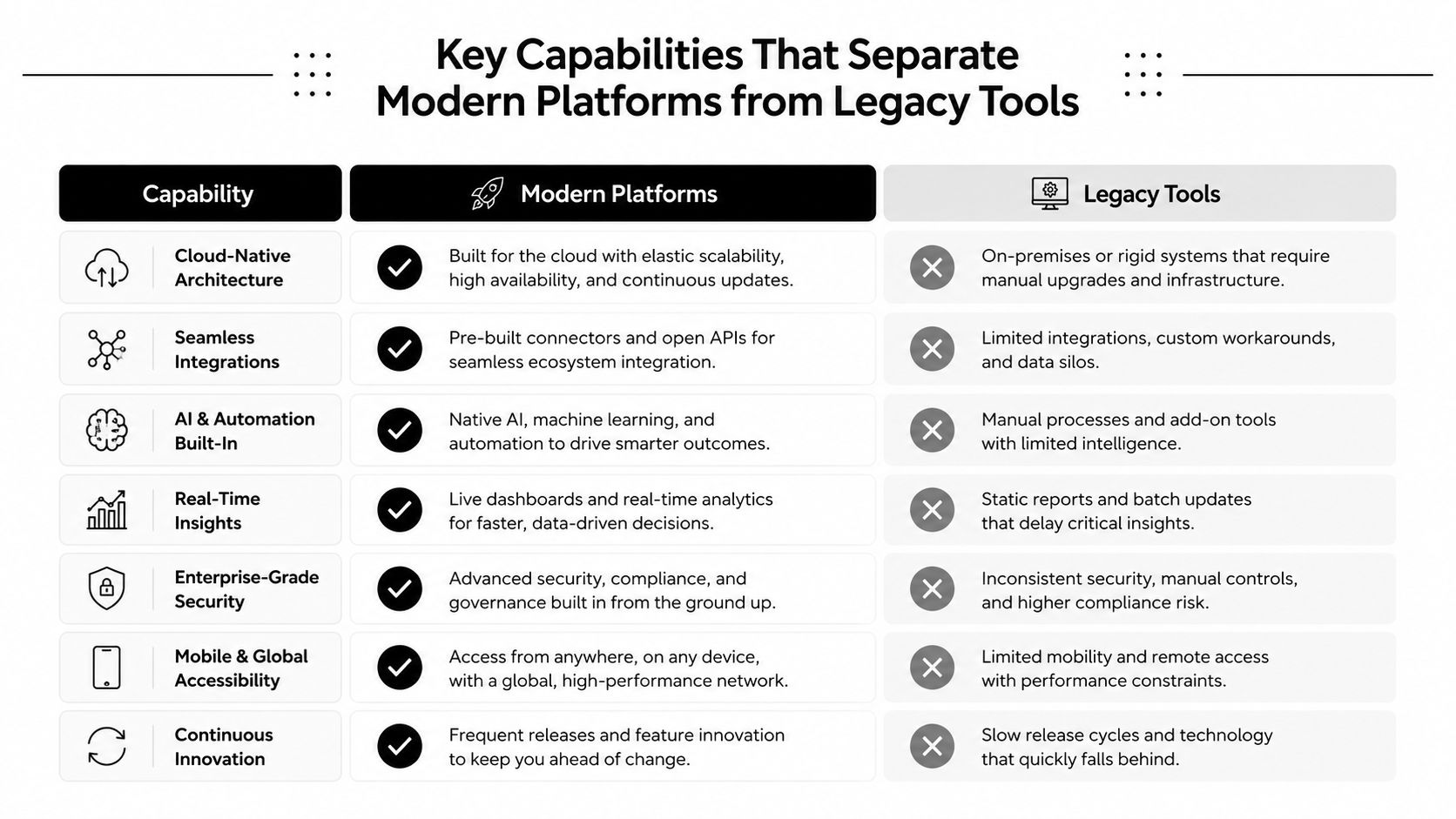
Legacy tools usually begin with a document and ask who should receive it next. Modern platforms begin with a changing information system and ask which published outputs need to reflect that change. Both can support approvals, but they solve different operational problems.
| Capability | Legacy approval-focused tools | Modern AI-assisted platforms |
|---|---|---|
| Source model | Usually centered on one document or repository | Combines repositories, specifications, crawled sites, uploads, and drafts |
| Change handling | Manual reopening and redistribution | Detects changes and proposes affected updates |
| AI editing | Often separate from the workflow | Embedded editing with review and reversal controls |
| Permissions | Broad document or folder access | Scoped roles, tokens, and publishing permissions |
| Developer integration | Connectors and exports | APIs, CI/CD hooks, repository apps, and MCP access |
| Analytics | Completion and approval status | Usage, search behavior, publishing history, and content signals |
Multi-source ingestion is now table stakes
A single-source workflow is easy to understand and easy to outgrow. Developer-first teams need to combine executable code, structured API definitions, existing prose, and internal material. The evaluation question isn’t whether a platform accepts multiple formats. It’s whether it can preserve provenance and explain conflicts.
Continuous synchronization is the differentiator. A manual import may solve migration, but it won’t prevent the next release from creating another drift cycle. Look for change detection, targeted regeneration, and reviewable proposals rather than a scheduled export that replaces content.
A broader market comparison, such as GetIntel’s overview of the best document management software, can help map storage and management capabilities, but engineering teams should test source synchronization separately. A system optimized for filing documents isn’t automatically equipped to maintain technical content.
Governance must cover AI and integrations
AI editing is useful when the writer can ask for a rewrite, a translation, a shorter explanation, or a new example without leaving the page. It becomes risky when the assistant can publish broadly with unclear authority. Undo and redo, version history, inline review, scoped permissions, and role-based access turn AI from an opaque shortcut into a controlled editing surface.
Headless workflows need similar care. API keys and CI/CD integrations should have narrow scopes, clear ownership, and separate read, edit, and publish capabilities. An MCP server can let assistants such as Claude, Cursor, ChatGPT, or a VS Code AI assistant search and modify documentation, but access should be granted according to the operation, not merely the user’s broad account role.
Search and delivery affect adoption
Documentation isn’t complete when it’s generated. Readers need semantic search, natural-language Q&A, embeddable widgets, authentication, custom domains, theming, and multi-version navigation when the use case requires them. Internal engineering knowledge bases and public API references may share content infrastructure, but they shouldn’t share the same access assumptions.
The practical test is simple: can the platform produce the right content, show it to the right audience, and reveal what readers still can’t find?
Evaluation Criteria for Engineering Teams and Technical Leaders
Vendor demos often show the happy path. Your evaluation should expose the awkward parts, especially conflicting sources, private content, rejected suggestions, and versioned releases.
Start by drawing the documentation topology. Mark public API documentation, internal runbooks, customer portals, archived versions, and content generated from repositories. Then ask each vendor to demonstrate the exact path from source change to reviewed publication.
| Criteria | What to Look For | Why It Matters |
|---|---|---|
| Source flexibility | Git repositories, API specs, crawls, uploads, and manual drafts | Your content won’t remain in one format |
| Synchronization | Change detection, affected-page updates, and visible diffs | Prevents silent drift and unnecessary rewrites |
| Governance | Audit history, approvals, undo, and publication controls | Makes AI-assisted editing accountable |
| Access control | Public, private, gated, and hybrid delivery | Separates customer content from internal material |
| Developer integration | GitHub Apps, APIs, CI/CD hooks, and MCP support | Keeps documentation inside engineering workflows |
| Presentation | Custom domains, theming, navigation, and versioning | Makes adoption possible across audiences |
| Observability | Search queries, page usage, and publish history | Shows where content still fails readers |
Questions worth asking in a live demo
Ask the vendor to change one endpoint in a repository and show every proposed documentation update. Then reject one suggestion, edit another, and publish only the approved change. If the system can’t show provenance and decision history, it isn’t giving you reliable governance.
Test permissions with separate roles. A technical writer may need to edit, a reviewer may need to approve, and a CI process may need to prepare changes without publishing them. Confirm how the platform handles private documentation, customer authentication, and public content within one environment.
Watch for red flags:
- Opaque regeneration: The platform replaces pages without showing what changed.
- Single-source assumptions: It requires teams to discard existing specifications or content.
- All-or-nothing permissions: Read, edit, and publish access cannot be separated.
- Export dependence: The “automation” ends when someone has to copy content into another system.
- No exception path: Reviewers can’t correct a generated result without breaking synchronization.
The right tool should reduce operational load after adoption. If maintaining the automation requires a permanent manual reconciliation job, you’ve moved the bottleneck rather than removed it.
Real-World Use Cases Across Different Team Types
A developer tools company often starts with a GitHub repository and a familiar complaint: engineers update code, but documentation changes only when someone remembers to open a separate task. The useful workflow connects repository changes to documentation proposals. Engineers keep working in Git, while writers and reviewers inspect targeted updates before publication.
That setup is different from a sales contract workflow. The document isn’t moving between signers. It’s evolving alongside a product, and the critical event is a source diff rather than a signature. The platform succeeds when it makes the relationship between the diff and the affected content obvious.
API-first SaaS teams
An API-first SaaS company may maintain an OpenAPI specification, quickstarts, SDK examples, and a customer-facing help center. A change to an endpoint can affect reference material, authentication guidance, error handling, and code samples. A multi-source system can use the specification for structured reference content while preserving editorial explanations from existing pages.
Authentication becomes part of the content architecture. Public onboarding material can remain open, while account-specific or early-access documentation sits behind an authenticated portal. The same organization may also maintain internal implementation notes, but those pages need separate permissions and review expectations.
Engineering teams and internal knowledge
Internal documentation decays when ownership is unclear and updates depend on memory. A private knowledge base connected to source repositories can link operational guidance to the systems it describes. When a configuration, service boundary, or deployment process changes, the resulting review request gives an owner a concrete reason to revisit the page.
Automation shouldn’t publish every inferred change. Internal content often includes judgment, incident context, and local conventions that code can’t establish. The platform should surface likely updates and let engineers decide whether the page needs a factual revision, a warning, or no change.
Open-source maintainers
Open-source projects face version pressure. Maintainers may need current documentation, older release guidance, migration notes, and deprecated references visible at the same time. Multi-version support prevents a new release from erasing the context users of older versions still need.
A practical workflow ties versions to release branches or clearly defined publication states. It also makes rejected updates visible, because maintainers need to know whether a proposal was intentionally declined or lost in a queue.
The common thread across these teams is source fragmentation. The output differs, but the operating requirement stays constant: detect change, identify impact, review the proposal, and preserve an accountable publication record.
Implementation Roadmap and Migration Checklist
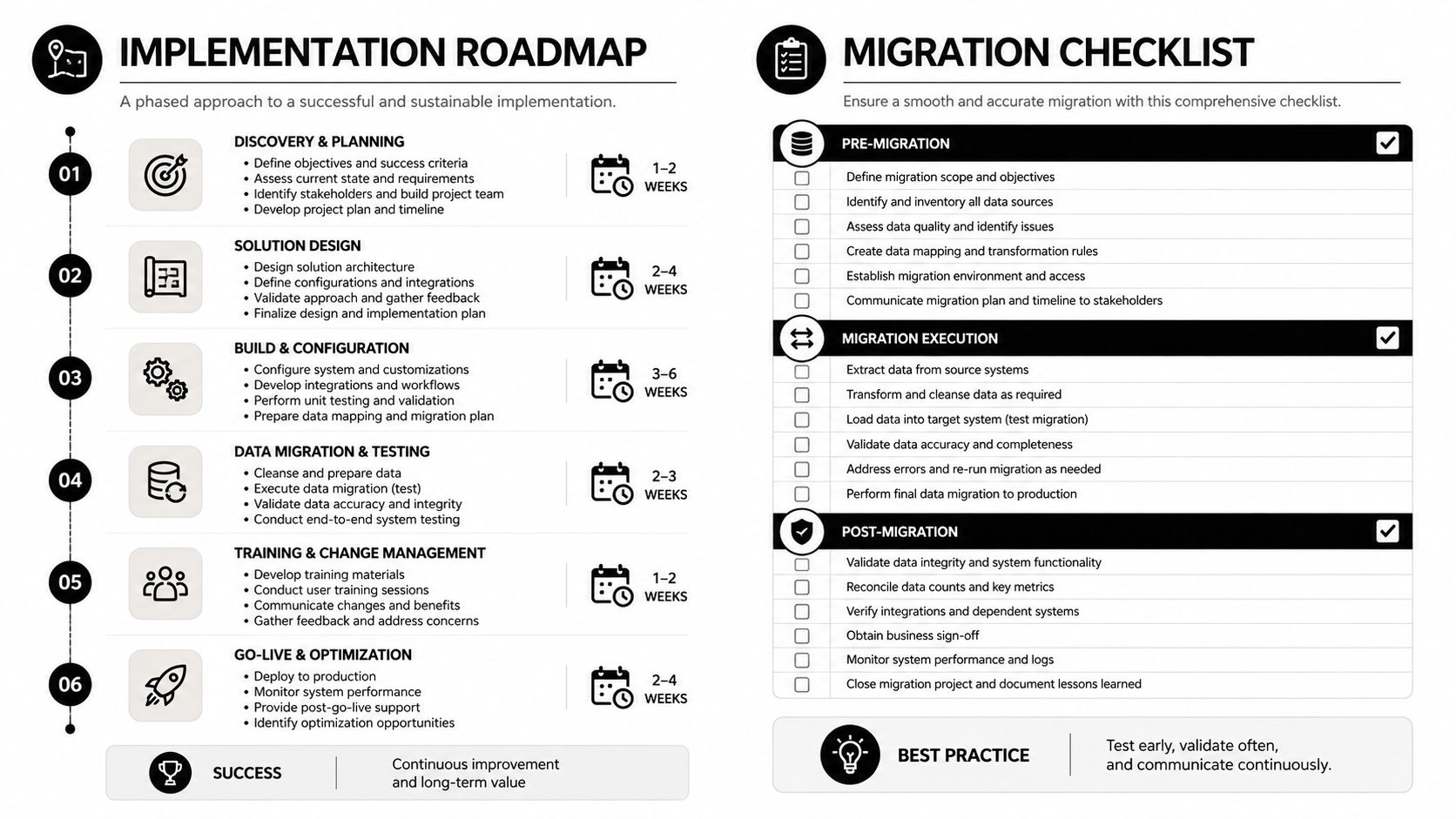
Treat adoption as a content migration and process-design project, not a tool switch. Start with one documentation surface where the source is reasonably understood and the cost of failure is manageable. Use that rollout to clarify ownership, review rules, and exception handling before expanding to other teams.
Establish the source map
Inventory repositories, specifications, existing websites, file archives, and manually maintained pages. For each source, record its owner, update pattern, sensitivity, and role in the final documentation. Decide which source wins when two inputs disagree, and document that rule before connecting automation.
Next, connect the repository or other primary sources. Configure the target domain, branding, navigation, versions, and access model. Public docs, private knowledge bases, and authenticated customer portals should have deliberate boundaries rather than inherited defaults.
Build review before generation
Define who can review, who can edit, and who can publish. Create a small set of realistic change tests:
- Routine change: Update a parameter or product description and inspect the proposed pages.
- Rejected change: Decline a suggestion and verify that the current published content remains intact.
- Manual correction: Edit generated content and confirm that the change is recorded and reversible.
- Sensitive content: Confirm that private pages aren’t exposed through search, embeds, or integrations.
- Version change: Publish an update without damaging the content for an older version.
For teams connecting GitHub, GitDocAI’s GitHub synchronization resource provides a useful reference point for thinking about repository-driven updates.
Go-live checklist
Before moving readers to the new system, verify:
- Ownership: Every major area has a named content or engineering owner.
- Source clarity: Conflicts between code, specifications, and prose have a documented resolution rule.
- Review controls: AI proposals require the intended level of human approval.
- Access boundaries: Public, private, and authenticated content behave as designed.
- Rollback: Editors can undo, reject, or restore a prior version.
- Reader paths: Search, navigation, examples, and version links work from a clean session.
- Operational signals: The team can inspect publish history and unresolved content issues.
Migrate in stages. Keep the existing site available while validating representative pages, then redirect only after reviewers confirm content parity and access behavior. Don’t import every historical document blindly. Archive material that has no owner or clear audience, because automation can preserve clutter just as efficiently as it preserves useful content.
How GitDocAI Addresses the Gaps in Modern Documentation Workflows
GitDocAI fits the developer-first version of this problem by treating a GitHub repository as one input to a continuously maintained documentation system. Teams connect the GitHub App, and the platform ingests the codebase to generate a branded documentation site. When code changes, it detects the diff, regenerates affected pages, and presents the result as a PR-style pending change for review, acceptance, rejection, or inline editing.
That workflow addresses the synchronization failure directly. It doesn’t assume that every generated suggestion is correct, and it doesn’t force reviewers to compare an entire site after every commit. The review surface remains tied to the source event.
Multiple inputs without abandoning existing material
GitDocAI can bootstrap a site from a GitHub repository, an OpenAPI or Swagger specification, a website crawl, uploaded files such as PDFs, markdown, Word documents, and plain text, or a plain-English product description. Teams can combine those sources in one site, which is useful when the repository contains implementation detail but the existing website contains customer language and the specification contains structured API data.
The platform also supports custom domains, theming, light and dark modes, navigation controls, and multiple documentation versions. Public documentation, private internal material, authenticated customer portals, and hybrid setups can use the same general publishing model while applying different access rules.
AI assistance with boundaries
The inline MDX editor provides autosave and version history, while an embedded AI assistant can rewrite sections, correct grammar, shorten explanations, translate text, add examples, or draft new content. Suggestions remain editable and include undo and redo, so the writer retains control rather than accepting an irreversible output.
For teams building AI-assisted workflows, the MCP server adds a headless access path. Connected assistants can search and edit documentation through structured tools, with scoped permissions for reading, editing, and publishing. API keys support CI/CD integrations, while team roles and analytics provide operational visibility.
A broader AI-oriented perspective, such as the Nuwtonic Agentic AI SEO Platform, can help teams think about how automated systems interact with discoverability and content operations. That concern complements, but doesn’t replace, source governance.
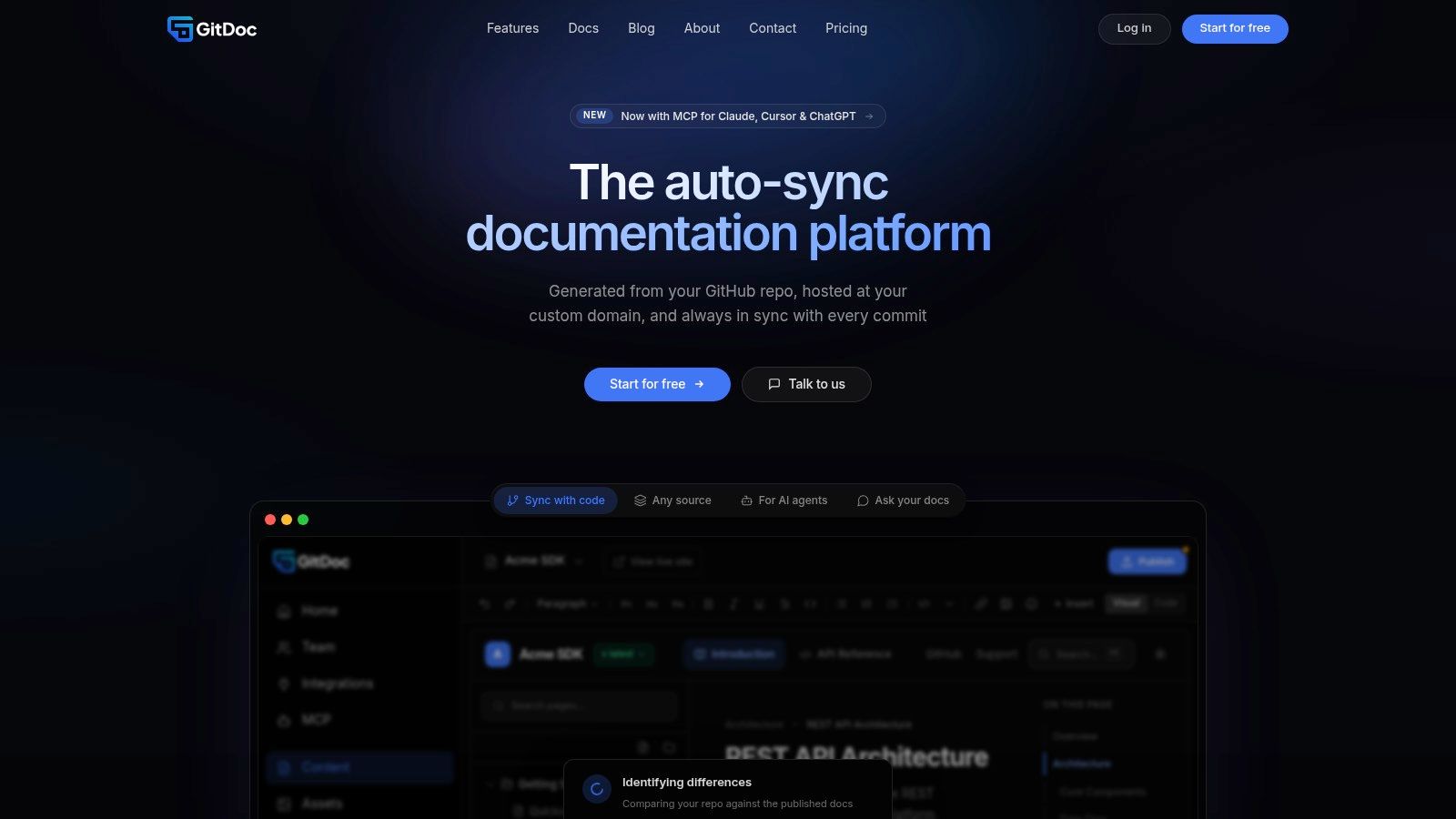
The important distinction is operational. GitDocAI isn’t merely moving files through approvals. It connects changing engineering sources to proposed documentation updates, gives people a controlled review loop, and supports public and private delivery from the resulting system.
GitDocAI turns GitHub repositories and other source inputs into branded documentation that can stay aligned with product changes through reviewable, PR-style updates. If doc rot and fragmented sources are slowing your team, visit GitDocAI to evaluate a documentation workflow built around synchronization, governed AI editing, and controlled publication.